Navigating government portals can often feel like trying to solve a maze in the dark. If you have ever stood in a long line at a local administrative office, holding a folder of dusty papers, you know exactly how frustrating it can be. That is where MeeSeva TS comes in. Literally meaning “At your service” in Telugu, the MeeSeva platform was built with a simple, powerful dream: to bring public services closer to your home and make them completely transparent.
Today, whether you need to apply for a caste certificate for college admissions, download an income certificate for a scholarship, or regularise a land document, MeeSeva TS is your go-to central gateway. However, as the platform has grown to handle millions of transactions, citizens often run into slow login screens, pending application statuses, or tricky payment loops.
In this comprehensive guide, we will break down exactly how to use MeeSeva TS like a pro. We will look at how the system works behind the scenes, how to register and login on desktop or mobile, how to bypass technical glitches, and what to do if your application gets stuck in the pipeline.
Category A vs. Category B Services: The On-Ground Reality
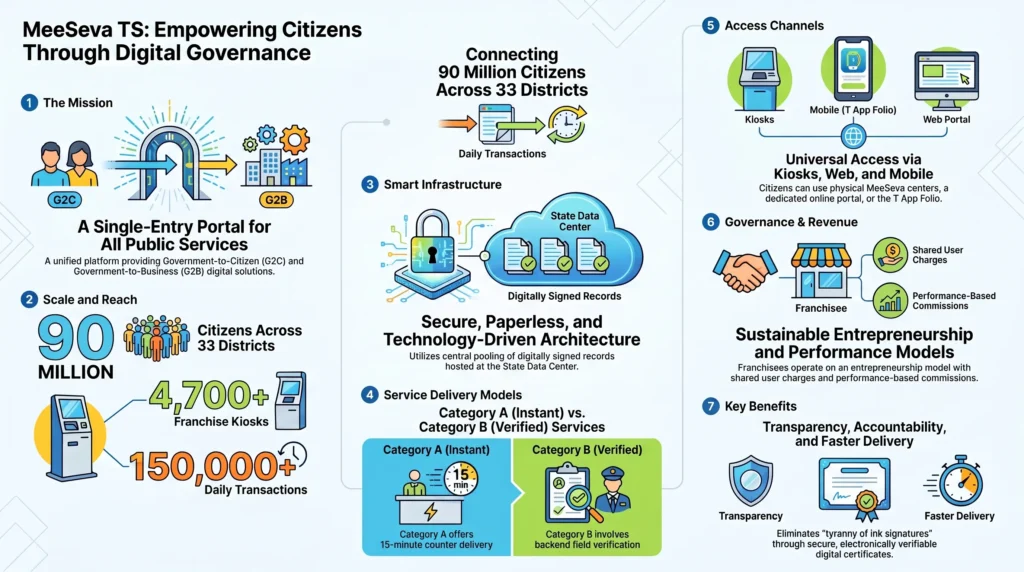
To understand why some certificates are issued in minutes while others take weeks, you need to understand the difference between MeeSeva’s two primary service categories.
1. Category A Services (Instant, Across-the-Counter)
These are services delivered within 15 minutes directly at a licensed kiosk. They rely entirely on pre-digitized, clean databases that are centrally signed. Because the records are already verified and stored in the database, citizens do not need to upload or present physical supporting documents. Examples include:
- Current Land Adangals or Pahanis
- Record of Rights (RoR 1B)
- Certified Copies of Registration Documents
- Existing Municipal Birth or Death Certificates
2. Category B Services (Verification-Based)
If no pre-existing digital record exists, or if the application requires physical field verification, it falls under Category B. For these services, the kiosk operator must physically scan and upload your supporting documents. Your application is then routed through a digital workflow to department officers (like Tahsildars or Mandal Revenue Officers) who conduct field inquiries.
Once approved, the system generates a binary code string and converts it into a tamper-proof PDF with a digitally signed QR code. Service Level Agreements (SLAs) for Category B services vary depending on the department:
- Income, Caste, and Residency Certificates: Standard 7 to 30 days.
- Regularisation of Sadabainamas (Unregistered Land Transactions): 30 days, though actual on-ground processing can vary.
- Double Bed Room House (2BHK) Applications: Officially up to 365 days.
On April 1, 2026, the Government of Telangana updated the official fee structure to account for operational inflation. Under this revision, Category A services are set at a base user charge of ₹62 (up from ₹35) and Category B services are set at ₹80 (up from ₹45). However, on-ground audits by the Anti-Corruption Bureau (ACB) have shown that local agents and private operators still frequently overcharge citizens, highlighting the need for strict personal tracking and direct digital portal access.
A Step-by-Step Citizen’s Guide: Logging In, Registering, and Tracking Status
You do not always have to visit a physical MeeSeva kiosk. MeeSeva TS offers a dedicated Citizen Login portal where you can submit applications, pay utility fees, and print certificates directly from your computer or phone.
How to Register a New Citizen Account
- Go to the official website: ts.meeseva.telangana.gov.in.
- In the top-right corner of the homepage, click on “Citizen Registration”.
- Fill in the registration form with your mobile number, full name, email address, and your Aadhaar number (optional).
- Click “Generate OTP”. You will receive a 6-digit One-Time Password via SMS on your registered phone.
- Enter the OTP in the designated field to verify your identity.
- Create a strong password, confirm it, and click “Submit” to complete your registration.
How to Login to MeeSeva 2.0
- Open ts.meeseva.telangana.gov.in in your web browser.
- Click “Citizen Login” in the top-right menu.
- Enter your registered mobile number or unique User ID.
- Type your secret Password.
- Enter the security CAPTCHA or OTP if prompted.
- Click “Login” to enter your personalized dashboard.
How to Track Your Application Status
If you have already applied for a service (such as an Income or Residence certificate) and want to know its progress, you can track it without logging in:
- Visit meeseva.telangana.gov.in.
- Locate the “Know Your Application Status” search box on the homepage.
- Select your service type from the dropdown list.
- Enter the unique Transaction ID or Application Number printed on your physical receipt.
- Type the verification CAPTCHA code exactly as shown.
- Click “Submit.” The portal will instantly display the current stage of your file (e.g., Approved, Rejected, Pending with Tahsildar, or Not Viewed).
Actionable Escalation Matrix: What to Do When Your Application Gets Stuck
If you have submitted your application, paid your fees, and are still stuck waiting beyond the official SLA timeline, you do not have to just sit there. Here is a clear, step-by-step escalation path to get your file moving.
Step 1: Standard Helpline and Online Grievances
Before taking formal legal steps, try lodging an official complaint through the portal’s built-in grievance channels. This alerts district coordinators to technical bottlenecks in your file.
- Toll-Free Customer Care: Call 1100 or 1800-425-1110 (Available Monday to Saturday, 10:30 AM to 06:00 PM).
- Support Email: Send your transaction receipt and a screenshot of the pending status to meesevasupport@telangana.gov.in.
Step 2: The In-Person Route – Prajavani (Praja Bhavan)
If your online complaints go unanswered, you can file a physical petition.
- Important Update: The old online grievance portal (cpgrams.ts.nic.in) was officially discontinued on June 1, 2026.
- The Process: You must submit your grievance petition in person at the Mahatma Jyothiba Phule Praja Bhavan in Hyderabad. Prajavani sessions are held every Tuesday and Friday.
- Tracking: Upon submission, you will receive a physical acknowledgement receipt with a unique Reference ID. You can track the status of this petition online at prajavani.cgg.gov.in.
Step 3: The Legal Route – Filing an RTI (Right to Information)
If your certificate remains pending with no recorded explanation, you can use the RTI Act to compel the department to share its administrative file. Filing an RTI does not force the officer to approve your certificate, but it forces them to put the official reasons for the delay in writing, which often speeds up the process.
- Identify the issuing authority on your MeeSeva receipt (for instance, the Tahsildar/MRO for caste or income certificates, or the GHMC Commissioner for Hyderabad birth records).
- File your RTI application online via the Telangana RTI Portal (rti.telangana.gov.in) or submit a physical Form A.
- Address your application to the State Public Information Officer (SPIO) of the concerned office.
- Ask specific, record-based questions. For example:
- What is the daily progress record of my MeeSeva Application Number [Your Number]?
- Please provide the names and designations of the officers with whom my application has been pending since submission.
- Please provide a copy of the official rules or G.O. that state the prescribed timeline for processing this certificate.
Step 4: Judicial Recourse and High Court Precedents
If there is persistent neglect, you can challenge the delay in court. In several notable rulings, including Vairagade Babu Rao v. State of Telangana, the High Court ruled that applications for land mutations, subdivision surveys (F-Line), and Pattadar Pass Books filed through MeeSeva cannot be ignored or delayed without a clear, recorded legal reason.
The court issued a writ of mandamus directing revenue authorities to process all pending MeeSeva applications strictly in the order they are received (seriatim processing), in compliance with G.O.Ms.No.209. If your land mutation is delayed, citing this High Court precedent in your representations to the District Collector can provide significant administrative leverage.
Conclusion: The Future of Digital Governance in Telangana
MeeSeva TS has come a long way since its early days as a pilot project. By replacing ink signatures with secure digital registries and building a network of thousands of local kiosks, the platform has made it much easier for citizens to access key services.
Disclaimer: This guide is strictly informational and compiled from official e-governance guidelines and state policy audits as of July 2026. Always ensure you are visiting the official government portals (ts.meeseva.telangana.gov.in or prajavani.cgg.gov.in) to perform actual logins and financial transactions.